Confidentiality Notice
This document contains confidential information belonging to SymphonyAI. It is shared here exclusively as a technical writing work sample to demonstrate documentation structure, style, and methodology. No part of this document should be reproduced or disclosed to third parties without prior written consent from SymphonyAI.
Overview
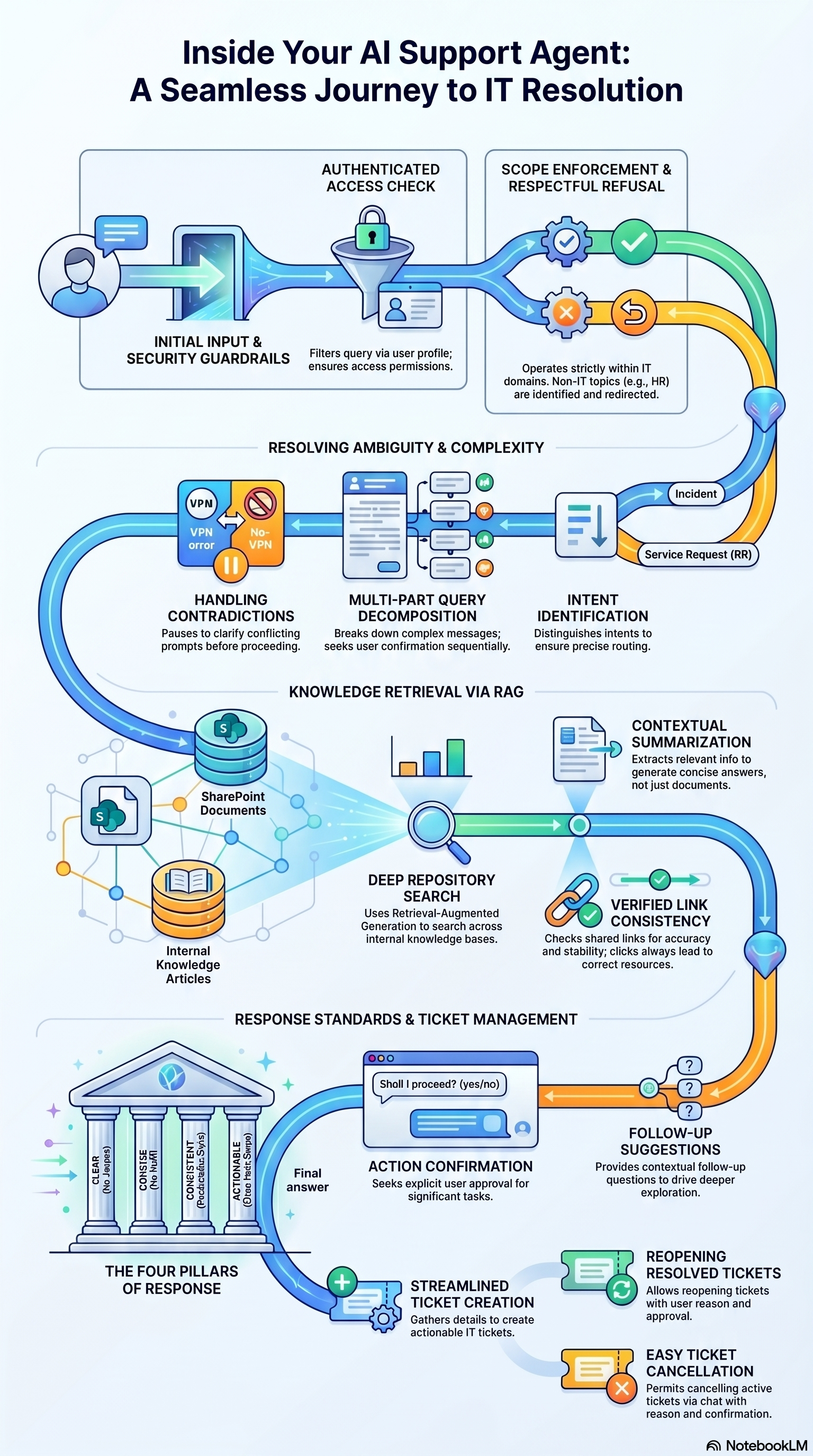
The AI support chatbot is designed to provide seamless and productive interactions using four core principles:
- Clarity: Responses are straightforward and avoid unnecessary jargon, ensuring the user understands what the bot is communicating or requesting.
- Conciseness: Answers are direct and to the point, avoiding overly lengthy explanations.
- Consistency: The bot uses familiar, predictable language across all conversations.
- Actionability: If a task requires a next step, the bot provides exact instructions or links for follow-up. It will explicitly seek a “yes/no” confirmation before proceeding with important tasks, such as creating an incident.
1. Enterprise Knowledge Search
The agent enhances self-service by utilizing Natural Language Processing (NLP) and Retrieval-Augmented Generation (RAG) to search internal repositories, such as Knowledge Articles and SharePoint.
- Summarization: It extracts relevant information and generates concise, contextual answers.
- Source Attribution: The chatbot provides clickable hyperlinks to the source documents used to generate the answer.
- Progressive Support: It suggests contextual follow-up questions to drive deeper exploration and ensure the user’s issue is fully addressed.
2. Privacy, Security, and Guardrails
To ensure data security and maintain service quality, the chatbot operates under strict guardrails:
- Permissions-Based Access: The bot only retrieves information and performs actions that the authenticated user account is explicitly permitted to access.
- Scope Restriction: Responses are strictly limited to Enterprise Knowledge Management (EKM), ITIL, IT Service Management (ITSM), and general IT topics.
- Out-of-Scope Handling: If a user asks a non-IT question (e.g., HR policies or travel bills), the bot will politely inform them that the topic is outside its area of expertise and ask if they need assistance with a technology-related matter.
3. Handling Ambiguity and Complex Prompts
The bot is equipped to handle complex, multi-part, or contradictory user inputs effectively:
- Contradictory Prompts: If a prompt contains conflicting information, the bot pauses to ask for clarification before taking any action.
- Multiple Questions: If a user submits several requests in one message, the bot separates the queries, lists them individually, and asks for explicit confirmation before processing each one. Out-of-scope queries within a list are respectfully skipped without interrupting the valid requests.
- Terminology Handling: For end-users, the term “ticket” defaults to an Incident; for IT Analysts, it refers to both Incidents and Service Requests unless specified otherwise.
4. End-User Ticket Management
Users have direct control over their tickets through the chatbot interface:
- Reopening Tickets: If an issue recurs after a ticket has been resolved, users can prompt the bot to reopen it. The bot will ask for a specific reason (e.g., “Issue re-occurring”) and confirm before updating the status.
- Canceling Tickets: Users can cancel active incidents or service requests that they created if they are no longer needed, again requiring a reason and a confirmation step.
5. Link Consistency and Redirection
The chatbot is programmed to ensure a reliable redirection experience:
- Functional Links: Any link provided—whether to an internal portal, a service request form, or an approved external site—is verified to be a working web page.
- Predictable Experience: Web pages opened via the chatbot will accurately reflect the bot’s description, ensuring users do not encounter unexpected content.