Overview
The Agentic AI IT Support Agent is an advanced virtual helpdesk solution designed to modernise and streamline common IT interactions within an organisation. By leveraging natural language understanding (NLU) and conversational interfaces, the agent enables users to report incidents, submit service requests, and perform multi-factor authentication (MFA) resets without the need to navigate complex ticketing systems or complete lengthy web forms.
The primary objective of the system is to deliver a seamless user experience that matches the quality of skilled human support while maintaining rigorous security, auditability, and operational efficiency. This report details the technical framework, operational logic, and functional capabilities that allow the agent to optimise service delivery within the enterprise service management ecosystem.
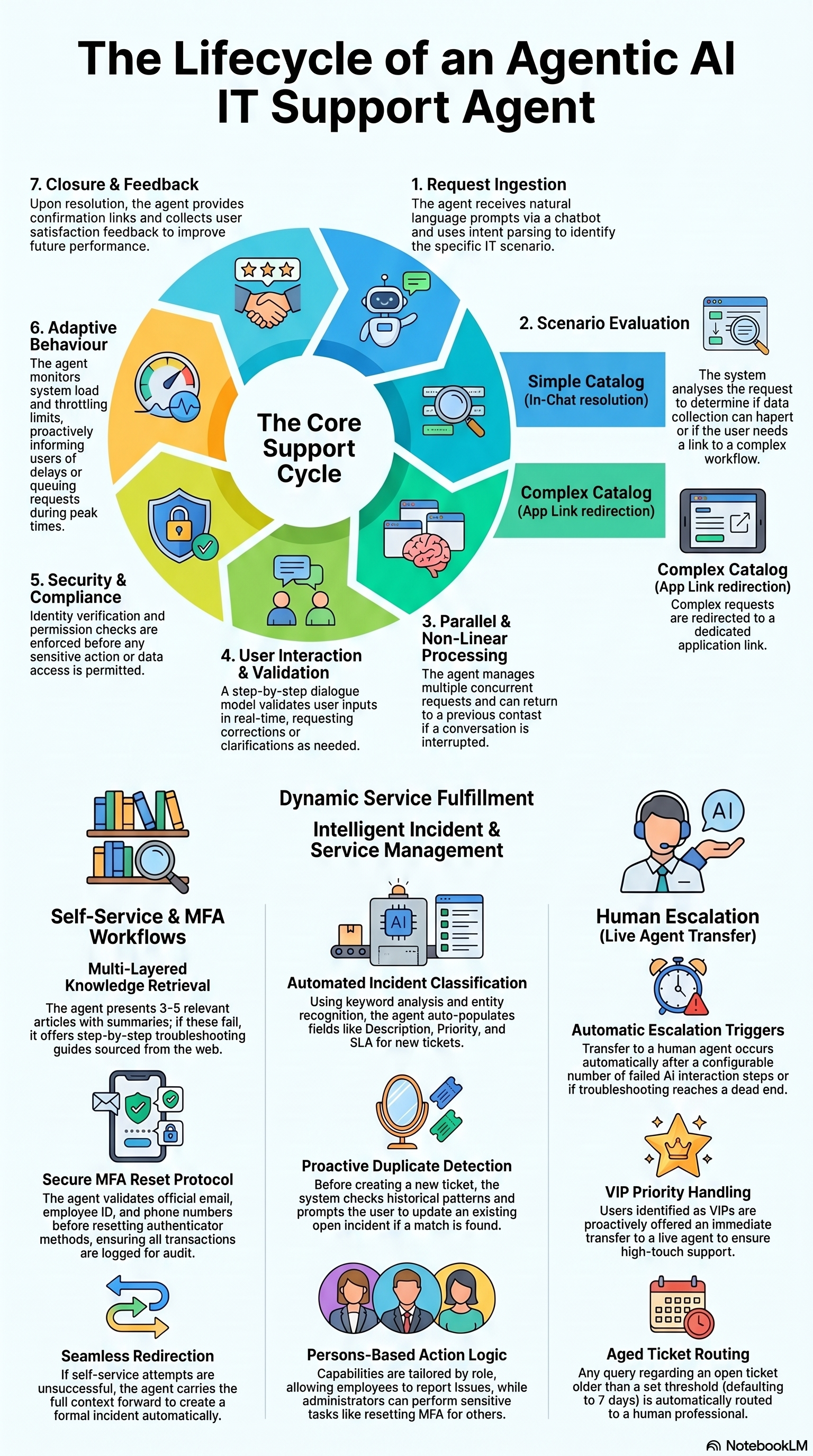
1. The Agentic AI Operational Cycle
The AI Support Agent follows a structured seven-stage lifecycle to process and resolve requests. This cycle is designed for high accuracy and adaptive performance:
- Request Ingestion: The agent receives input via the conversational interface and utilises natural language processing to determine user intent and identify the specific support scenario.
- Scenario Evaluation: The system identifies the appropriate workflow and data requirements. It evaluates the complexity of the request to determine if data can be captured conversationally or if the user requires redirection to a complex form.
- Parallel & Non-Linear Processing: The agent manages concurrent requests and non-linear conversation branching. It supports user-initiated interruptions and can return to a previous context to maintain interaction continuity.
- User Interaction: Following a step-by-step dialogue, the agent prompts for necessary data and performs real-time validation of responses to ensure accuracy and completeness.
- Security & Compliance: Stringent identity verification and permission protocols are enforced. Sensitive actions and data access are gated based on organisational policy and verified against the user’s profile.
- Closure and Feedback: Upon resolution, the agent confirms the action, provides relevant links or confirmation IDs, and collects satisfaction data to further optimise future system behaviour.
2. Incident Management Workflows
2.1. Incident Classification and Creation
The AI Support Agent utilises keyword analysis, entity recognition, historical patterns, and specific user history to classify inputs as incidents (example: hardware failures or outages). The system automatically populates essential fields, including Description, Priority, and Service Level Agreement (SLA), based on the user’s prompt and contextual signals.
2.2. Smart Duplicate Detection
To maintain system integrity, the agent performs a duplicate check once sufficient information is captured. If an existing open incident is identified for the same issue, the agent displays the details and prompts the user to either update the existing ticket or proceed with a new record.
2.3. Update and Ownership Validation
Security logic ensures that modifications to records are authorised. The agent verifies incident ownership before allowing updates; if a user attempts to modify a ticket they did not create, the agent prevents the action and provides a notification regarding the lack of permission.
| Capability | Description | Example Interaction |
|---|---|---|
| Knowledge-First Deflection | Searches the knowledge base for solutions before a ticket is formally raised. | Suggesting troubleshooting articles for the corporate email client when a user reports a mail error. |
| Smart Duplicate Detection | Identifies existing open incidents to prevent redundant tickets in the system. | Notifying a user that a Wi-Fi outage ticket is already in-progress for their account. |
| Incident Lifecycle Management | Logs new incidents or adds comments to existing ones using natural language. | Auto-logging a printer connectivity issue with a default “Low” or “Medium” urgency. |
Note: Default urgency and impact are set to
Low/Mediumunless the user explicitly specifies a"High"status, which remains subject to later adjustment by a human analyst.
3. Service Request Fulfillment Logic
3.1. Intelligent Catalog Evaluation
The agent applies a specific evaluation logic to determine the most efficient data collection channel based on the complexity of the service catalog:
Data Collection Logic:
- Conversational Data Capture: Utilised for simple catalogs with fewer than five input fields. These fields must consist of configurable parameters (such as dropdowns or text inputs). Data is collected one-by-one within the chat interface.
- External Form Redirection: Triggered for complex catalogs containing five or more fields. Furthermore, any catalog requiring Date or Time fields will automatically trigger redirection to the main service management application, regardless of the total field count.
3.2. Request Management
Users can search the service catalog using everyday language. The agent assists with guided selection when multiple matches are found and provides real-time status updates on raised requests, including current approval states and creation timestamps.
3.3. Access and Asset Requests
For access-related requests, such as shared drive permissions, the agent prompts for required data and fetches a list of potential approvers directly from the Service Management platform. Users can select the appropriate approver within the chat to facilitate downstream routing.
4. Self-Service Knowledge Base Assistance
4.1. Natural Language Querying
The agent interprets intent from conversational language, allowing users to find solutions for issues like network connectivity without requiring technical jargon or specific keywords.
4.2. Article Retrieval and Presentation
The system retrieves 3–5 relevant knowledge base articles, presenting them with concise summaries and clickable links for immediate access.
4.3. Troubleshooting and Multi-Step Guidance
If initial articles fail to resolve the issue, the agent provides iterative, step-by-step troubleshooting guides to assist the user through deeper technical resolution.
4.4. Escalation Path
When a user reports that self-service solutions “do not work”, the agent follows this structured escalation path:
- Presentation of initial relevant Knowledge Base articles.
- Delivery of detailed troubleshooting steps curated from internal resources and verified external community sources.
- Proactive offer to escalate the issue if the user rejects the troubleshooting steps as unsuccessful.
- Redirection to incident creation or a live agent transfer (LAT).
5. Secure Multi-Factor Authentication (MFA) Reset
5.1. Identity Verification Protocols
Before performing a reset, the agent validates the user’s identity by fetching data from the identity provider, including the official organisation email, Employee ID, and associated primary/secondary phone numbers.
5.2. Reset Execution
Upon successful verification, the agent initiates a reset of all registered MFA methods (excluding the account password). During this process, the system ensures that associated phone numbers remain on file to facilitate secure reconfiguration. Users are notified that they must perform a fresh MFA setup upon their next login.
5.3. Audit and Compliance
All reset transactions are logged for audit purposes. If identity cannot be verified, the request is automatically escalated to human support. For users who have not yet configured MFA, the agent provides a notification that the initial setup must be completed before a reset can be requested.
6. Advanced Routing and Live Agent Transfer (LAT)
6.1. Escalation Triggers
The system identifies four primary conditions requiring human intervention:
- AI Failure: Automatic escalation occurs after an administrator-defined number of failed interaction steps (e.g., troubleshooting does not resolve the issue).
- User-Initiated: Immediate transfer is triggered if a user explicitly requests to “talk to a human” or “speak to an agent”.
- VIP Handling: Identified VIP users are proactively offered priority support, allowing them to choose between the AI agent and a human representative.
- Aged Ticket Routing: For records that have remained open longer than a configurable threshold (default: 7 days), the agent routes queries to a human agent. For incidents, this is based on the age of the ticket; for Service Requests, the logic evaluates the creation date and time.
6.2. Handover Process
Before connecting to a human agent, the AI Support Agent notifies the user and requests final confirmation. Once confirmed, the conversation context is carried forward to the human agent to ensure a seamless transition without repetition.
7. Technical Framework and Governance
7.1. Persona-Based Access Control
Available actions are tailored based on the user’s organisational role:
- Employees: Authorised to report IT issues, request equipment, and update their own tickets.
- IT Administrators: Authorised to reset MFA for other users and review broader incident trends.
- HR/Managers: Authorised to initiate hardware or service requests on behalf of team members.
7.2. System Integrations
The agent integrates with three core pillars of the IT ecosystem via API:
- Service Management Platform: For managing the lifecycle of incidents and service requests.
- Identity Provider API: For handling MFA method resets and user profile validation.
- Knowledge Management: For providing conversational search and retrieval of self-service articles.
7.3. Known Limitations
The following constraints apply to the current system framework:
- Context Switching: The agent may behave unexpectedly if a user switches between different workflows mid-conversation.
- Language Support: The system is currently optimised for English only.
- Intent Detection: Vague or ambiguous requests may lead to misclassification; specific inputs are recommended.
- API Dependency: Performance is reliant on the availability and response times of the Service Management and identity provider APIs.
- MFA Reset Scope: The reset clears all registered MFA methods except the account password; granular selection of specific methods is not supported.